DTF + Screen printing = DTS

DTF with the soul of screen printing.

DTS Studio turns your artwork into a halftoned DTF file: lighter on the garment, more breathable, with the look of screen printing. It runs in your browser and gets the file ready in a couple of minutes.

Lifetime license300 DPI PNGMac and WindowsYour files stay on your computer
⇆
Solid DTFDTS
Drag to compare · real size, 30 cm wide print
since2006

Mario Barone has been printing apparel since then

300DPI

Resolution of the print-ready file

7styles

From round dots to stochastic for photos

€49

One-time payment, lifetime license

Previews

Six garments, six halftones. One source file.

Every preview is computed right now, in your browser, with the same method as the software. Hover over an image to see the original artwork.

The problem

A heavy print ruins even the best garment.

DTF made it possible to print even a single piece. But artwork printed solid sits on the garment like a sticker. Screen printers solved this with halftones, but recreating them by hand in Photoshop takes time and skill.

Solid DTF
  • A single layer of ink and glue, stiff to the touch
  • The garment can’t breathe under the print
  • Gradients and soft edges turn into halos
  • More film, more ink, higher cost per piece
DTS
  • Halftone on gradients: the print moves with the fabric
  • The garment color becomes part of the artwork and lightens it
  • Text, lines and solid fills stay solid and sharp
  • Less ink on every print

The software

Everything a screen printer would do by hand.

Open your artwork, pick the garment color and move the sliders: the preview updates as you work. When you’re happy, export the print-ready file.

dtsstudio.it/app
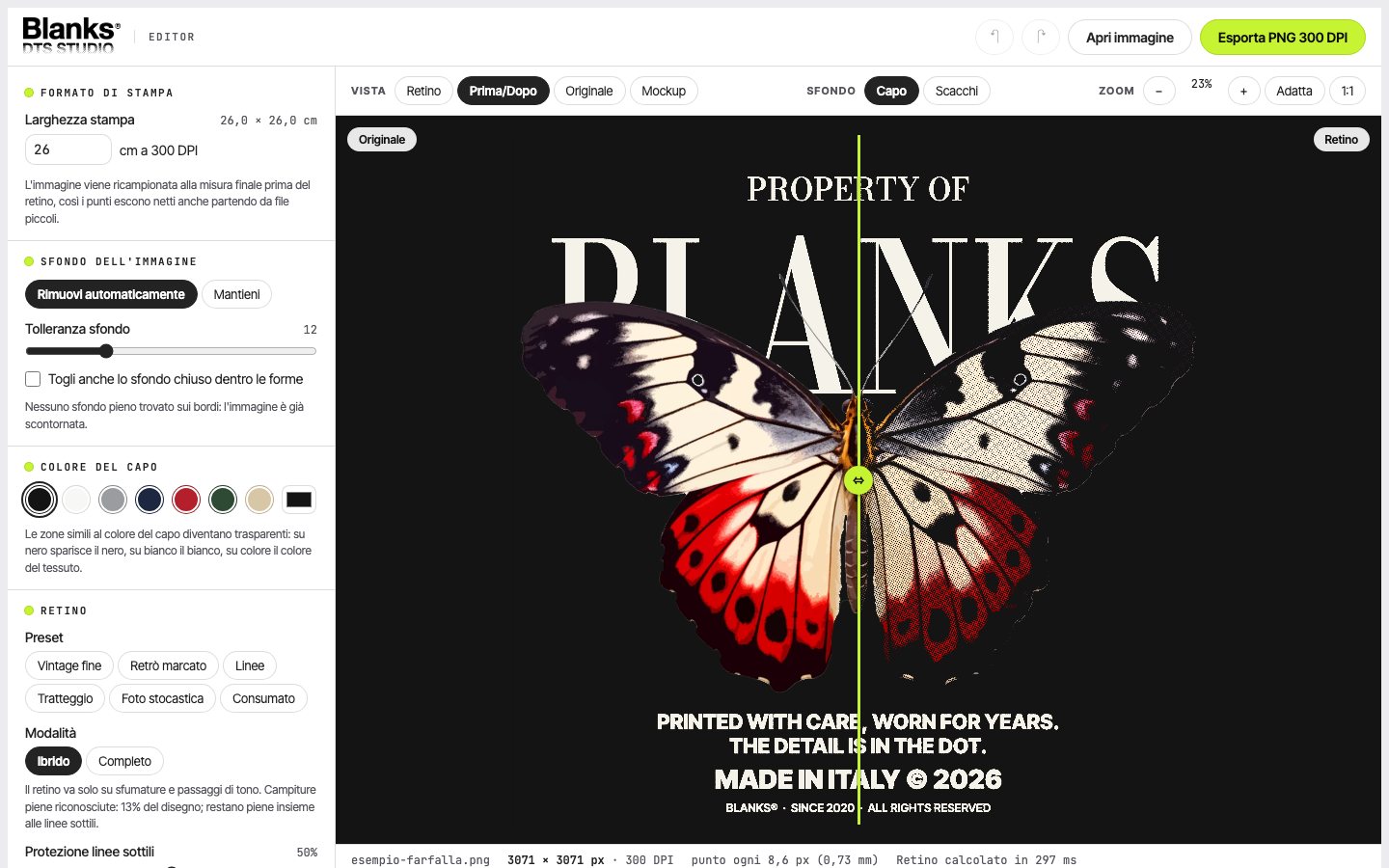
DTS Studio: original versus halftoned artwork
Before/after comparison, right in the editor
Mockup
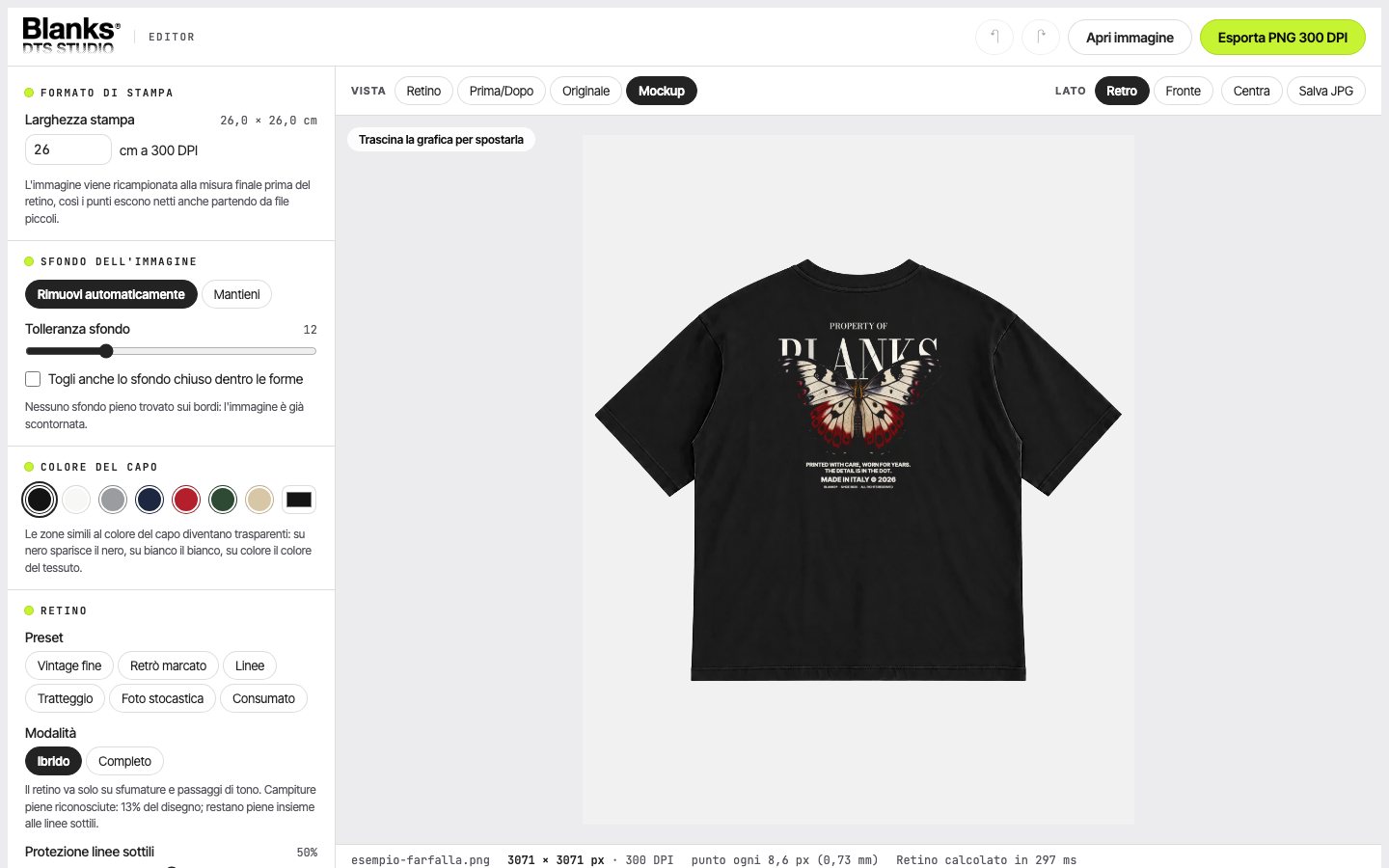
DTS Studio: print preview on a t-shirt
Photo mockup, front and back: move the artwork and save the JPG

Hybrid halftone

Text, thin lines and solid fills stay solid. The halftone goes only on gradients and tone transitions.

Garment color

On black it removes black, on white it removes white, on colors it removes the fabric color.

7 dot styles

Round, ellipse, square, diamond, lines, crosshatch and stochastic.

Automatic cutout

Removes the solid background of JPGs, even inside closed letters.

Color exclusion

Pick a color from the artwork and remove it from the print with one click.

300 DPI export

Transparent PNG at the size you choose in centimeters, with the resolution written into the file.

Organic grain

An irregular grain for a distressed look, adjustable in amount and size.

Dot cleanup

Converts semi-transparent edges and drops dots too small to survive washing.

Your files stay yours

Everything happens on your computer: your clients’ artwork is never uploaded to any server.

White underbase

Exports the white separately, shrunk by 0–3 pixels (choke) so it doesn’t show around the colors.

Levels and color

Black and white point, midtones, hue, saturation and lightness before the halftone.

Project files

Save artwork and settings in a single file: for a reorder, open it and print exactly the same.

How it works

From file to film in four steps.

  1. Load your artwork

    PNG, JPG or WebP. If there’s a solid background, DTS Studio detects it and removes it.

  2. Pick the garment

    Black, white or any color: the software makes transparent whatever the fabric can show on its own.

  3. Tune the halftone

    Start from a preset, then choose dot shape, screen ruling and angle.

  4. Export and print

    A transparent 300 DPI PNG, ready for your print software.

Comparison

The same result, without the hours of work.

DTS StudioPhotoshop by handOutside designer
Time per fileA couple of minutes20 minutes and upDays, from request to delivery
Skills neededNone, you start from presetsChannels, masks, halftone methodsNone, but you need a clear brief
Cost€49, one-timeMonthly Adobe subscriptionA fee for every file
Preview on the garmentYes, in real timePrepared separatelyOn request
Last-minute changesMove a sliderRedo the stepsNew request

Indicative times for a color artwork of average complexity.

About us

Made by people who make garments.

DTS Studio wasn’t born in a software house. It was born in a company that makes apparel and prints it.

  1. 2006Mario Barone starts out in apparel and printing, beginning with cut heat-transfer vinyl
  2. ThenDTG printing and screen printing arrive
  3. 2020Blanks is born: quality apparel, designed to be customized
  4. ThenDTF enters the workshop
  5. 2026DTS Studio: screen printing halftones applied to DTF

We know how much work goes into a well-made t-shirt: the yarn, the fabric weight, the hand feel, a fit that lasts after a hundred washes.

We’ve also seen the other side: artwork printed like stickers, stiff, unable to breathe, cracking. Good garments ruined by a heavy print.

DTS Studio prepares your artwork the way a screen printer would: halftone where it helps, solid where it must, transparent where the fabric can speak for itself.

Made by people who make garments. Mario Barone · Blanks

Pricing

One license. Forever.

No subscription. Pay once and get every future update too.

What’s included

  • The full DTS Studio, with all 7 styles and presets
  • Hybrid halftone, background removal, color exclusion, grain
  • Front/back photo mockup and before/after comparison
  • White underbase with choke, and project files for reorders
  • Transparent 300 DPI PNG export, unlimited files
  • Free lifetime updates
  • Email support from people who print every day
  • Printable A4 LPI test sheet to calibrate your printer
  • Invoice for businesses with a VAT number
Launch price until 31 December 2026
€49€79

VAT included · one-time payment · lifetime license

Buy DTS Studio → Try it free first

The trial has every feature; exported files carry a watermark until you activate the license.

FAQ

Before you buy.

Do I need to install anything?

No. DTS Studio runs in your browser on Mac and Windows: up-to-date Chrome, Edge, Safari and Firefox. Just open the page.

Is my artwork uploaded to a server?

No. All processing happens on your computer. Your clients’ files never leave your browser.

What file do I get?

A transparent 300 DPI PNG, with the resolution written into the file, at the width in centimeters you choose. It opens in any DTF print software.

Does it work on white and colored garments?

Yes. Pick the garment color and DTS Studio adapts the halftone: on black it removes black, on white it removes white, on colors it removes the fabric color.

Is it a subscription?

No. You pay once and the license is valid forever, updates included.

Do I get an invoice?

Yes, if you buy as a business: enter your VAT number at checkout. Businesses in other EU countries pay no Italian VAT (reverse charge). Private buyers receive the payment receipt; if you need an invoice, write to us.

Can I try it before buying?

Yes. The free trial has every feature; exported files carry a watermark. When you buy, you activate the license and the watermark disappears.

On how many computers can I use it?

The license is personal: it’s for one person, on every computer they use.